



Hard drive making a clicking noise: what should I do right now?
Every attempt you make can turn recoverable data into data that can no longer be recovered.
Switch the drive off, do not run it again and do not run any software.
If your hard drive is clicking, switch the device off right away and do not run it again. The noise usually means there is a problem with the read/write heads. Each time the drive runs, the heads can damage the platters, so do not keep trying. Whether the data can be recovered depends on the extent of the damage, and we can only see that by opening the drive in a clean environment. Call us for an analysis.
- Shut down the computer or external drive and unplug the cable.
- Store the device without shaking it, ideally in an antistatic bag or a soft case.
- If you have another backup of the important data, check it.
- Do not try things yourself when the data is important.
- Do not keep switching the drive on and off.
- Do not run chkdsk or any other repair tool.
- Do not install recovery software on this drive or run it from this drive.
- Do not open the drive yourself. Dust causes permanent damage to the heads and the platter surface.
- Do not put it in the freezer or the fridge.
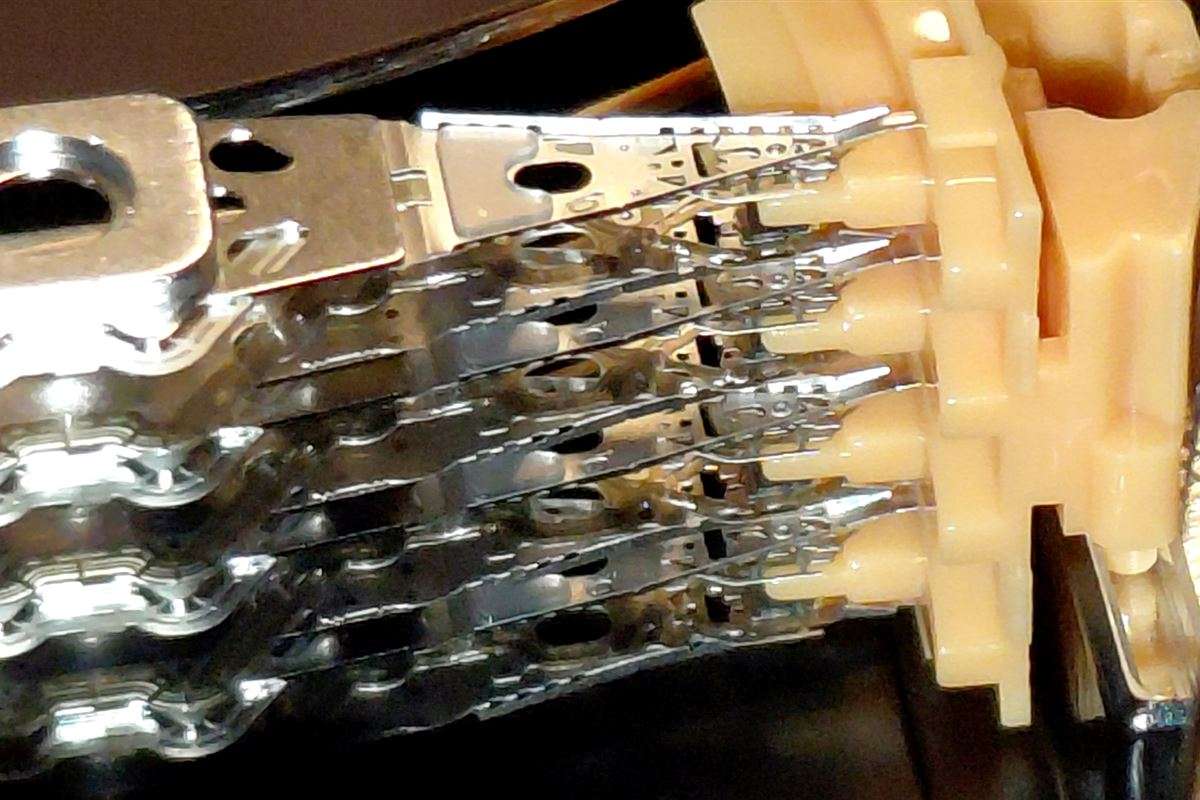
Why does a hard drive make a clicking noise?
In a working drive the platters spin and the read/write heads move just above them on a thin cushion of air. If a head cannot find the track information on the platter, or cannot get to the right position, it tries to reset itself to its starting point. This movement repeats over and over, and you hear it as clicking.
The noise usually comes from one of the following causes:
- Failed or displaced read/write heads, especially after a drop or impact
- Corrupted firmware (the drive's own software), in which case the drive cannot control the heads properly
- Damage to the platter surface
- In an ageing drive, heads that can no longer read the data on the platters
There is no way to tell from the outside which of these applies to your drive. The same noise can come from different faults.
What should you do based on the symptom?
| Symptom | Possible cause | Software or lab? | What should you do? |
|---|---|---|---|
| Regular clicking, the drive does not show up on the computer | Head failure or firmware corruption | Lab | Switch it off, do not try again, bring it to us |
| Grinding, scratching or sandpaper-like sound | Possible damage to the platter surface | Lab | Switch it off now, the damage can grow with every second |
| No clicking, the drive shows up but the files are missing | Deletion, formatting or file system corruption | Usually software, but working from a copy on another drive | Do not write to the drive, call us for an analysis |
| The drive does not spin at all and makes no sound | Possible power, motor or board problem | Lab | Apart from trying another cable, do nothing |
Can data recovery software be used while the drive is clicking?
It should not be. These programs read the whole drive from start to finish, and every time a clicking drive is forced to read, the heads can do more damage to the platters. The software does not solve the problem; it only makes the fault worse. It can turn data that could have been recovered into data that can no longer be recovered. Recovery software makes sense when the drive works properly and the files have simply been deleted. For details, see our page on recovery software or a lab.
What is done in the lab?
We first examine the device and identify the fault. If the heads have failed, the drive is opened in a Class 100 (ISO 5) clean environment, a compatible donor part is used where needed, and the data is copied to a healthy drive. A dust-free environment is necessary, because even a single speck of dust landing on the platter of a drive opened in an ordinary room can leave permanent damage.
After the analysis we tell you in writing what can be recovered and what it will cost. If you do not accept the quote, you get your device back without paying. Not every case falls within the scope of free analysis. For requests outside the free analysis scope, you are informed in writing about the analysis fee before any work begins.
Related pages
- Hard drive not showing up on the computer
- The first 10 minutes after data loss
- Data recovery from dropped or water-damaged devices
- New drive or data recovery?
- All data recovery services
How long does it take and how much does it cost?
Standard cases take 10 business days on average, and urgent cases take 24 business hours on average. The actual time depends on the type of fault, sourcing the parts needed and the capacity of the drive. Some jobs are completed within a few hours, while others can take months.
The price depends on the type of fault, the parts needed and how long the work takes. After the analysis we send you the exact price in writing. If you do not accept the quote, you get your device back without paying. Not every case falls within the scope of free analysis. For requests outside the free analysis scope, you are informed in writing about the analysis fee before any work begins. For details, see the pages on what determines the price and how long it takes.
Can the data always be recovered?
No. If the platter surface is badly scratched, if the drive has burned or been in water, or if the drive was left running and clicking for a long time, some or all of the data may not be recoverable. We cannot know the outcome without carrying out an analysis. After the analysis you will be informed about the situation.
Frequently asked questions
Does putting the drive in the fridge or freezer help?
No. Cooling does not fix a head failure. Moisture can condense inside a drive when it comes out of the cold, and that causes further damage.
What happens if I try the clicking drive one more time?
Every attempt runs the risk of the heads scraping the platters. If you are lucky, nothing changes. If you are not, a single attempt can leave a scratch on the platter. That is why we advise you not to try.
Is it any different if my external drive is clicking?
Mechanical external drives have the same parts inside, so clicking means the same thing. External SSDs have no mechanical parts and do not make this noise.
Do I pay anything if I do not accept the quote?
No. If you do not accept the quote after the analysis, you get your device back without paying. In cases where it cannot be foreseen at which stage the data will become accessible, the price may also be set after the data has been recovered, based on the time and resources spent on the work. In that case you are under no obligation to pay. Not every case falls within the scope of free analysis. For requests outside the free analysis scope, you are informed in writing about the analysis fee before any work begins.
Why is free analysis not available in every case?
For some requests a short assessment of the device is possible, and we can offer a free analysis. For others, our specialists can only reach an opinion or a result after long hours of work on your device with professional tools. Because we carry out the technical work that has to be done in the part we call analysis, we may not be able to offer those hours free of charge.
What do you do during the analysis?
During the analysis we actually begin the professional technical work that needs to be done. Many businesses, on the other hand, say they offer 'free analysis' to attract customers and get them to bring their device in, and once the device has been handed over, without setting aside any time for it, they say something like 'we will work on it; if it works it costs this much, if not, that much'. Having had the device handed over with the words 'free analysis', they know the customer will want the work to continue rather than go to the trouble of taking the device back, and since they put in no effort or time, they can claim to offer 'free analysis' in every case. In reality this is little more than a trap to attract customers.
Do you charge a service fee?
We do not charge anything under the name of a service fee. We offer free analysis. For requests outside the free analysis scope, the analysis fee is communicated in writing at the start. Some businesses advertise with phrases such as "600TL data recovery service fee", leading customers to believe they will have their data recovered for 600TL. That is how they draw customers in. We do not work in such an unethical way.
Let's assess your situation together: call 0212 909 56 19 or write to us on WhatsApp. See our contact page for the address and opening hours.
If you are not sure what to do, call us first
Tell us about your situation and we will tell you what to do first.